UNDERSTAND THE TASK. LEARN THE SYSTEM. VERIFY THE MACHINE.
Different CNC systems can support similar manufacturing tasks while using different interfaces, programming environments, data structures, and operating procedures.
Experience transfers most effectively when you understand the task behind the screen — and recognise what must be learned again on the actual machine.
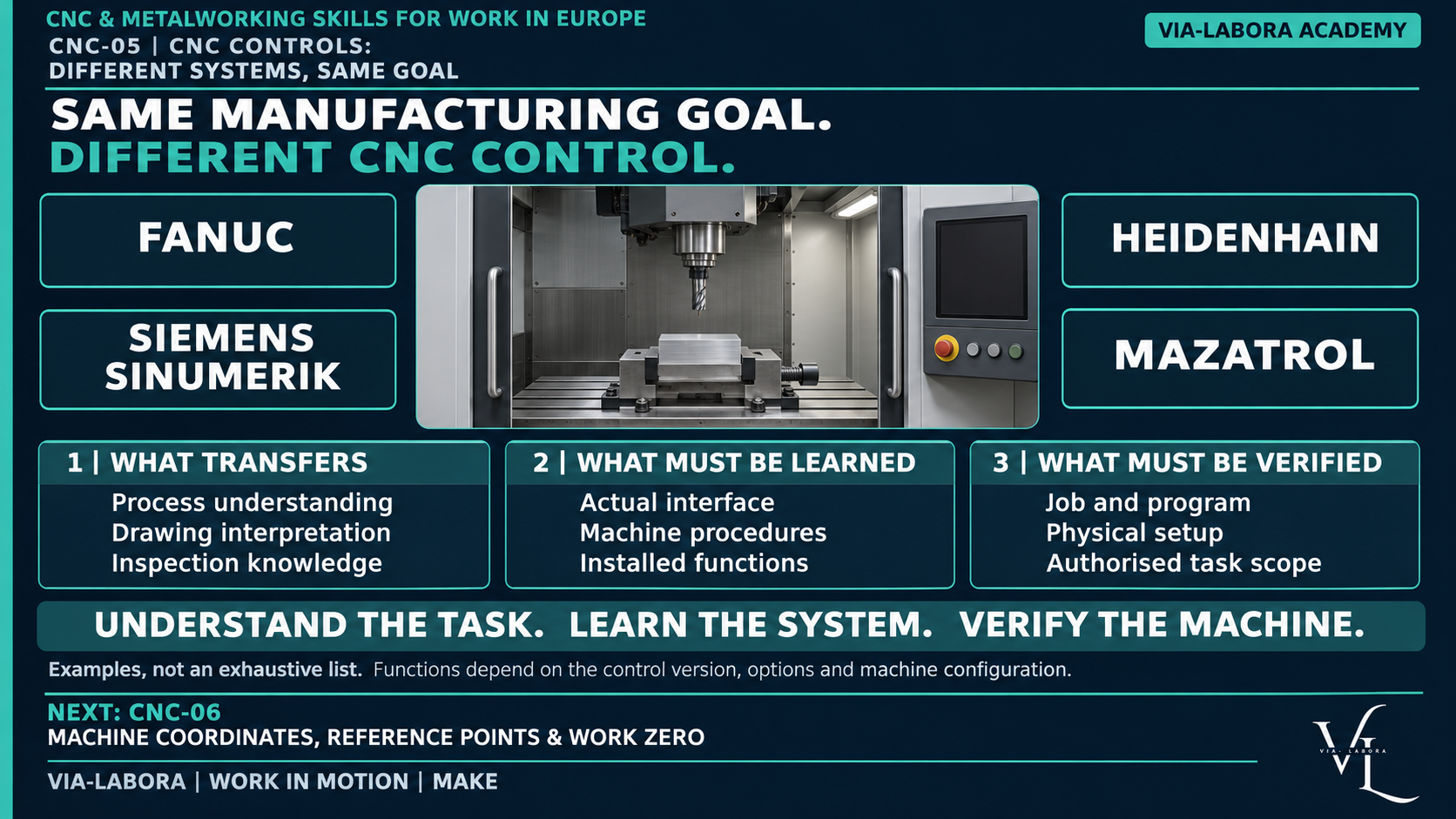
*Conceptual comparison, not an operating guide. Available functions depend on the control version, installed options, machine-builder integration, and machine configuration.*
Situation from Work
You have operated a milling machine with one CNC system. Your next employer uses a different system on another machining centre.
You recognise the need to identify the program, understand work coordinates, check tooling, and inspect the result.
However, the menus, data fields, verification functions, and machine behaviour are unfamiliar.
The right starting point is neither “I know nothing” nor “all controls are the same”.
You bring relevant process knowledge. You still need machine-specific training.
Who Is This For?
This lesson is for:
- Operators moving between machines or employers.
- Candidates describing their control experience.
- Setters and programmers planning a transition.
- Team leaders defining training needs.
- Beginners learning how process knowledge and control knowledge connect.
Recommended previous lesson: CNC-04.
What Will You Gain?
You will learn to separate transferable knowledge from system-specific operation.
You will also learn to ask for the information needed before working with an unfamiliar machine.
Learning Objectives
By the end of this lesson, you should be able to:
- Explain the role of a CNC control.
- Distinguish process, machine, control, and programming method.
- Identify common information areas in CNC work.
- Describe the four system names in this series without rigid stereotypes.
- Explain why programs and data are not automatically portable.
- Prepare a practical machine-transition checklist.
- Describe your experience accurately in an interview.
Technical Foundation
What does a CNC control do?
A CNC system interprets suitable instructions and coordinates programmed machine movements and functions.
It works as part of the machine’s wider control architecture, including drives, machine logic, operator interfaces, and other systems.
The screen is an interface to that environment. It is not the entire machine-control system.
The control executes instructions within its capabilities. It does not automatically establish that the material, tooling, workholding, program, and job requirements are correct.
Four different categories
| Category | Question | Example |
|---|---|---|
| Process | What happens to the material? | Milling |
| Machine | What equipment performs the work? | A specified machining centre |
| Control | What system executes and manages the machine instructions? | A specified SINUMERIK model |
| Programming method | How are suitable instructions prepared? | CAM-generated code or an available conversational environment |
A brand name alone does not describe the complete working environment.
Common tasks, different implementation
Across CNC work, people may need to:
- Identify the active job and program.
- Understand machine status and operating conditions.
- Review relevant tool information.
- Understand the coordinate information used by the job.
- Verify the prepared operation.
- Interpret messages and alarms.
- Execute approved production.
- Record and respond to inspection results.
How those tasks are performed depends on the actual system and machine.
Similar-looking buttons or screens do not prove identical behaviour.
Four systems in this series
FANUC
FANUC supplies multiple CNC series used in different machine configurations. The series, software, options, and machine-builder implementation matter.
“FANUC experience” should therefore be expanded with the machine and tasks involved.
SINUMERIK
SINUMERIK is Siemens’ CNC family. Different models, software versions, and installed functions support different working environments.
Experience with one installation should not be presented as knowledge of every SINUMERIK machine.
HEIDENHAIN
HEIDENHAIN supplies different control families and models. TNC systems are associated with milling applications, while other product families address turning.
The brand should not be treated as one interface, one language, or one process capability.
MAZATROL
MAZATROL is associated with Mazak CNC systems and conversational programming.
Conversational programming helps describe work through structured inputs, but it still requires correct geometry, tooling, process decisions, and verification.
Supported programming methods and functions depend on the actual control and machine.
These four names are not an exhaustive list. Press brakes, laser systems, and other equipment can use different or manufacturer-specific control environments.
Programming methods are not interchangeable labels
A machine may support some combination of:
- Text-based NC programming.
- Conversational or cycle-based programming.
- Programs prepared through CAM and an appropriate postprocessor.
Availability and compatibility must be confirmed.
A CAM postprocessor produces output for a defined target environment. A familiar control brand alone is insufficient to establish that the output suits another machine.
Conversational programming is not automatic process engineering. CAM is not automatic proof of a safe or correct operation.
Why programs and data do not transfer automatically
Two machines may share a control family and still differ in:
- Axes and kinematics.
- Tool changing and tool identification.
- Workholding and accessories.
- Machine-specific functions.
- Installed options.
- Program conventions and supported cycles.
- Data structures and coordinate arrangements.
- Verification and restart procedures.
Do not copy a program or data set and assume compatibility.
Terminology EN / PL
| English | Polski |
|---|---|
| CNC control | Sterowanie CNC |
| Control family / series | Rodzina / seria sterowania |
| Software version | Wersja oprogramowania |
| Operator interface | Interfejs operatora |
| Machine builder / OEM | Producent maszyny / OEM |
| Installed option | Zainstalowana opcja |
| Conversational programming | Programowanie konwersacyjne / dialogowe |
| NC program | Program NC |
| CAM | Komputerowe wspomaganie wytwarzania |
| Postprocessor | Postprocesor |
| Machine configuration | Konfiguracja maszyny |
| Alarm | Alarm |
| Verification | Weryfikacja |
| Authorisation | Upoważnienie |
Process Explanation
Step 1 — Identify the environment
Record the machine manufacturer, model, control model, software version where relevant, and installed functions needed for the job.
Step 2 — Identify the task
Are you running an approved job, preparing a setup, editing a program, or investigating a problem?
Different tasks require different competence and authority.
Step 3 — Map familiar concepts
Identify the information you understand from previous work: job identity, tooling, references, verification, inspection, and reporting.
Do not guess where or how to change it.
Step 4 — Learn the local implementation
Use applicable manuals, workplace instructions, and supervised training.
Establish which actions have machine-specific consequences.
Step 5 — Demonstrate the task
Complete the required supervised practice and assessment.
Familiarity with a menu is not evidence of independent competence.
Step 6 — Work within the released scope
Perform only the tasks for which you have been trained and authorised.
Worked Example
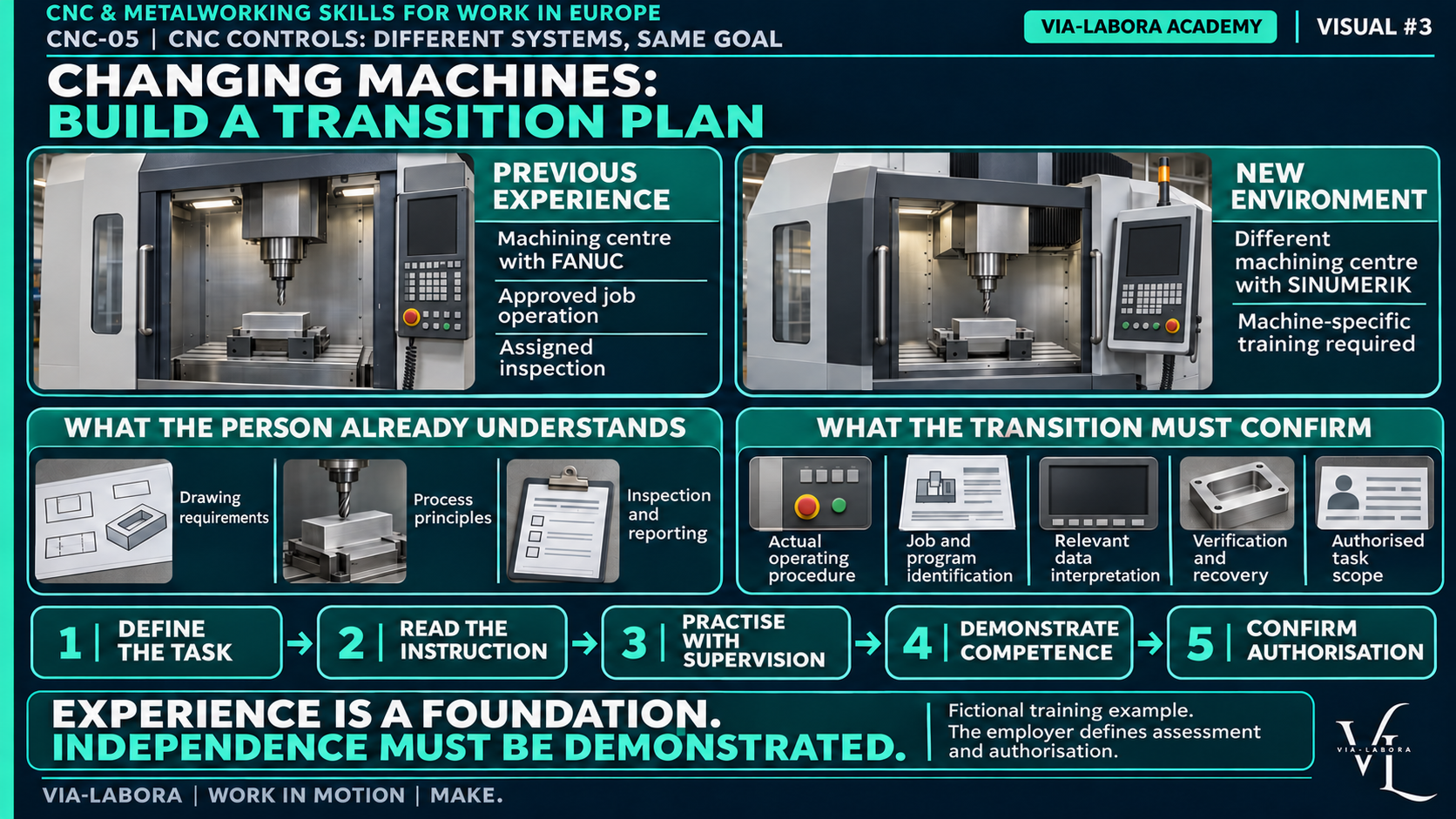
Moving between two machining centres
A candidate has experience running approved milling jobs on a machine with a FANUC control.
The new role uses a machining centre with SINUMERIK.
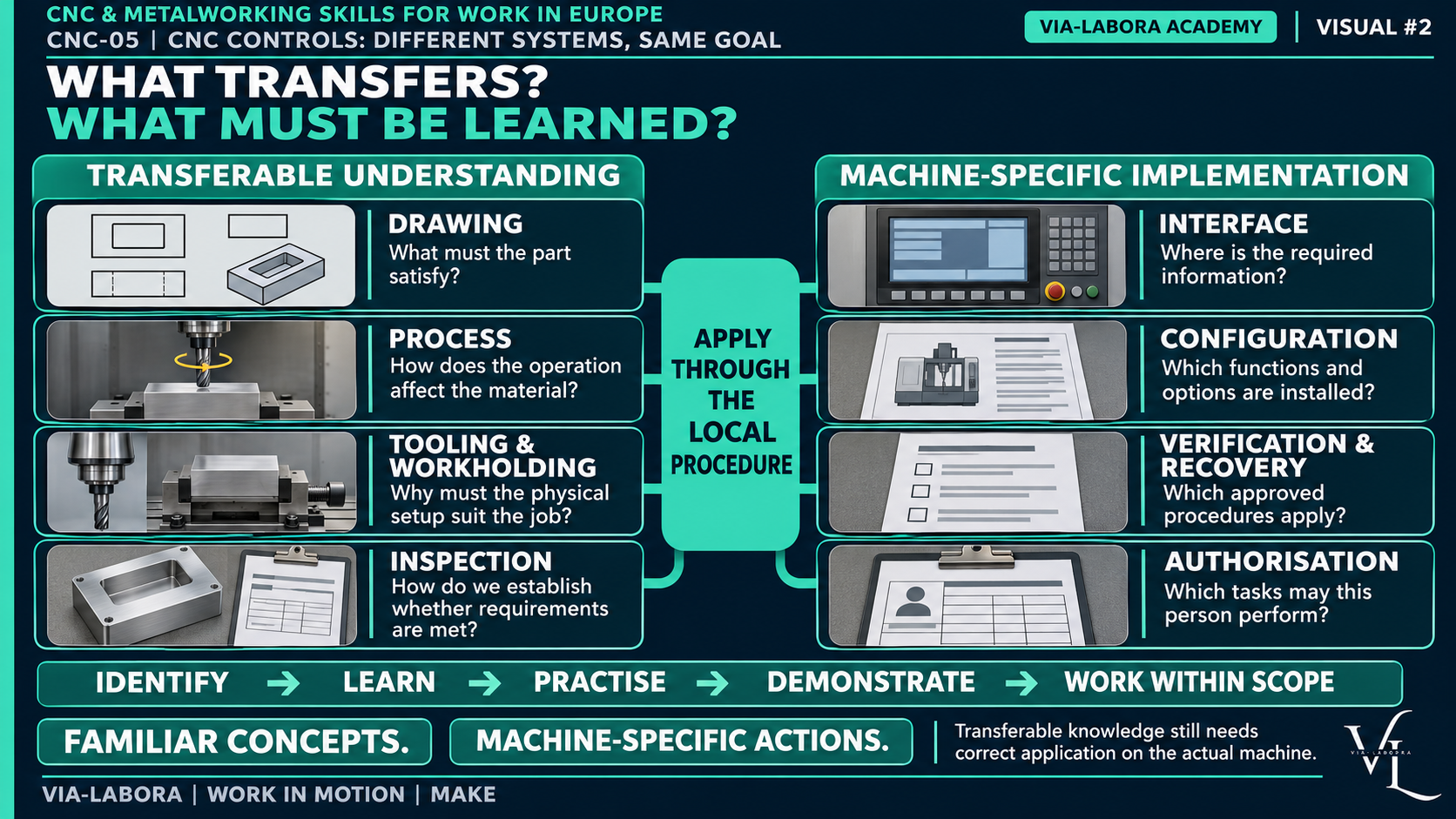
Transferable knowledge
- Reading applicable requirements.
- Recognising tools and workholding.
- Understanding why coordinates and tool data matter.
- Following inspection plans.
- Reporting nonconformity.
Training still needed
- The actual interface and machine operating procedures.
- Program identification and selection.
- Relevant data interpretation.
- Approved verification and recovery procedures.
- Machine-specific alarms and escalation.
The candidate should not independently recreate familiar actions by trying similar-looking controls.
A useful transition plan defines tasks, supervision, evidence, and release to independent work.
Control / Process Differences
Changing control does not automatically change the manufacturing process.
Changing process can require substantial new knowledge even when the control brand is familiar.
For example:
- Milling experience does not establish press-brake competence.
- Turning experience does not establish laser-cutting competence.
- Experience with one control does not establish every machine function.
- Knowledge of a program format does not establish setup competence.
CNC-06 will introduce machine coordinates, reference points, and work zero. Detailed data entry belongs to the appropriate machine-specific instruction.
Common Mistakes
| Mistake | Better approach |
|---|---|
| “All controls are basically identical.” | Separate common tasks from different implementation. |
| “I know the brand, so I know the machine.” | Identify the model, configuration, and actual duties. |
| “Conversational programming removes the need for process knowledge.” | Correct inputs still depend on technical understanding. |
| “CAM output can run on any machine.” | Confirm the target machine, postprocessor, and verification. |
| “The same code must behave the same way everywhere.” | Confirm the actual supported syntax and machine implementation. |
| “An alarm should be cleared until the machine runs.” | Follow the diagnostic and recovery procedure. |
| “Knowing the interface means I can set up independently.” | Demonstrate the complete task and obtain authorisation. |
Practical Exercise
Exercise 1 — Classify the knowledge
Mark each item as primarily transferable understanding or machine-specific implementation.
A. Why the correct drawing revision matters.
B. How to perform the approved restart after an interruption.
C. Why tooling must match the job.
D. Which screen field contains the relevant value on this installation.
E. Why a nonconforming result must be reported.
Answers
Transferable understanding: A, C, E.
Machine-specific implementation: B, D.
Even transferable concepts must be applied through the local procedure.
Exercise 2 — Improve the experience statement
Rewrite:
“I know FANUC and can use any CNC.”
Example:
“I have operated approved turning jobs on a specified lathe with a FANUC control. I performed assigned inspections and reported deviations. I need machine-specific training before working independently on another installation.”
Use your actual experience.
Exercise 3 — Ask before transferring a program
List four questions before reusing a program on another machine.
Possible answers:
- Is it approved for the target machine and configuration?
- Are programming functions and options compatible?
- Do tooling, references, and workholding match the assumptions?
- What verification and release are required?
Knowledge Check
- Is the interface the entire control system?
No.
- Does a control brand identify a manufacturing process?
No.
- Does the same control family guarantee program portability?
No.
- Does conversational programming remove the need for technical knowledge?
No.
- What should identify control experience?
Machine, control model where known, actual tasks, and independence.
- Can milling knowledge transfer to another control?
Relevant concepts can transfer, but machine-specific operation requires training.
- Should an unfamiliar alarm be repeatedly cleared?
No. Follow the approved diagnostic and recovery process.
- What establishes readiness for independent work?
Demonstrated task competence and workplace authorisation.
Use It in a Technical Interview
“I understand the process and the checks behind my current work. My experience is with this machine and control, performing these tasks. I can transfer that understanding, but I would need training on your machine’s operation and procedures.”
Avoid ranking controls as “easy” or “difficult” without explaining the task and your experience.
Use It With Your Team
Build a transition plan around tasks:
Task → instruction → supervised practice → assessment → authorised scope.
Include the person providing support and the procedure for unresolved questions.
Key Takeaways
- Common manufacturing goals do not imply identical controls.
- Identify the actual machine and control version.
- Separate process knowledge from interface familiarity.
- Programming methods and machine capabilities require confirmation.
- Program and data compatibility must be verified.
- Understand the task. Learn the system. Verify the machine.
Downloadable Resource
CNC Machine & Control Transition Checklist
Machine manufacturer / model:
Control model / software:
Previous experience:
New task scope:
Trainer / responsible person:
For each task record:
Task | Applicable instruction | Supervised practice | Evidence | Authorised scope
Tasks to consider:
- Identify job and program.
- Interpret relevant machine status.
- Locate and interpret assigned data.
- Perform approved verification.
- Run approved production.
- Respond to alarms and interruptions within scope.
- Perform inspection and reporting.
Open question:
Responsible person:
Resolution:
This is a training-planning aid, not an operating procedure.
Candidate CTA
Describe the machines, controls, and tasks you have actually used. Explain your independence and where you need training.
Contact VIA-LABORA to discuss your technical experience.
B2B CTA
Specify the machine, control, configuration, and responsibilities behind the vacancy.
Contact VIA-LABORA to discuss candidate matching and onboarding needs.
Previous / Next Episode
← CNC-04 — From Drawing to CNC Machine
Next: CNC-06 — Machine Coordinates, Reference Points & Work Zero